Screenshots

Introduction
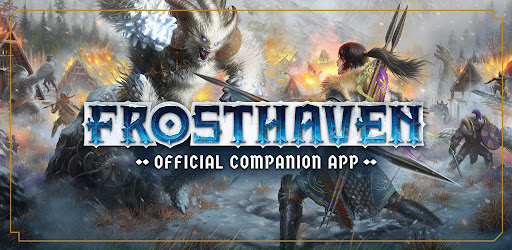
The Frosthaven: Official Companion app, developed by Lucky Duck Games, is an indispensable tool for fans of the highly acclaimed board game Frosthaven. Designed to streamline gameplay, this companion application significantly reduces setup time and enhances the overall gaming experience. With a plethora of features aimed at managing multiple campaigns, tracking game statistics, and improving player interaction, the app serves as a virtual assistant for both novice players and seasoned veterans of the Frosthaven universe.
Graphics & Gameplay
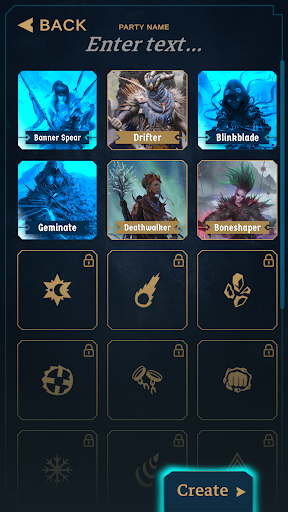
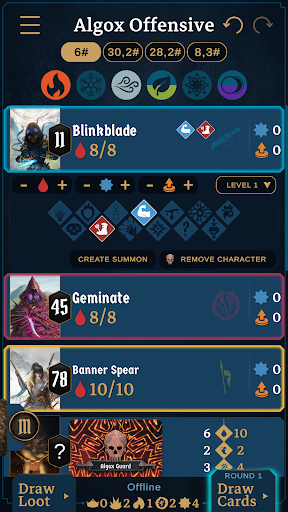
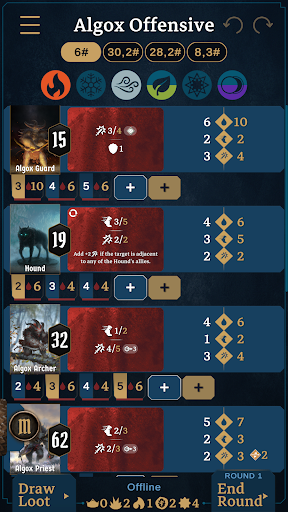
The visuals of the Frosthaven: Official Companion app are engaging and user-friendly, featuring a clean interface that is easy to navigate. The screenshots showcase a well-organized layout where players can easily access different functionalities such as scenario selection, party management, and game tracking. The color palette is vibrant yet not overwhelming, with intuitive icons that guide users through various tasks. Each screen is designed to provide crucial information at a glance, from monster stats to party health, making it easier for players to focus on the game rather than getting bogged down by setup. The fluid animations enhance the interactivity, allowing users to quickly toggle between different scenarios and features without facing lag or performance issues.
Key Features
- Multiple Party Management: Create and maintain multiple parties, allowing you to manage several campaigns simultaneously.
- Real-Time Synchronization: Sync across multiple devices, enabling remote play or allowing all players at the table to view crucial stats without sharing devices.
- Scenario Setup: Choose a scenario to play, and the app automatically sets up monster stats, ability decks, and loot decks for that scenario.
- Progress Tracking: Mark scenarios as started or completed and keep track of your progress efficiently.
- Dynamic Monster Management: Automatically instantiate monsters for specific sections of a scenario and draw from attack modifier decks as needed.
- Initiative Sorting: Input hero initiatives and automatically sort monsters and abilities by initiative order for seamless gameplay.
- Health and Condition Tracking: Maintain the health, experience points (XP), loot, and various conditions of heroes and monsters effortlessly.
- Custom Session Creation: For those who prefer unique gameplay, create custom sessions by adding any monsters from the game.
- Element Status Maintenance: Keep tabs on the status of the six elements relevant to gameplay.
- Session Resumption: Pause and resume your game at any point, ensuring you return exactly where you left off.
Mod Features
- Premium Unlocked: Enjoy all features without any limitations, allowing you to access advanced functionalities that enhance gameplay.
- No Ads: A completely ad-free experience ensures that your gameplay remains uninterrupted, allowing for complete focus on the action.
- Unlimited Resources: Gain access to unlimited in-game resources, making it easier to create custom sessions or manage multiple campaigns without constraints.
- Enhanced Customization: Unlock additional customization options for heroes and monsters, allowing for a more personalized gaming experience.
- Exclusive Scenarios: Access special scenarios and challenges not available in the standard version of the app for an expanded gameplay experience.
How to Install APK on Android
Installing the Frosthaven: Official Companion APK on your Android device is a straightforward process. Follow these steps to get started:
- Enable Unknown Sources: Go to your device's Settings, navigate to Security, and enable the option to install apps from unknown sources.
- Download the APK: Click on the download link provided below to fetch the APK file.
- Locate the APK: Use a file manager app to find the downloaded APK file, usually located in the "Downloads" folder.
- Install the APK: Tap on the APK file and follow the on-screen instructions to install the application on your device.
- Open the App: Once installed, locate the app icon in your app drawer and tap to launch it. You’re now ready to enhance your Frosthaven experience!
Conclusion
The Frosthaven: Official Companion app is a must-have for anyone looking to elevate their Frosthaven gameplay. With its intuitive design, extensive features, and the ability to manage multiple campaigns seamlessly, it offers a significant advantage over traditional board game setups. Whether you are playing with friends around a table or coordinating a remote session, this app will undoubtedly enhance your gaming experience. Don’t miss out on the opportunity to streamline your gameplay!
Ready to enhance your Frosthaven experience? Download the Frosthaven: Official Companion app now! Download Here