
My Expenses: Your Ultimate Financial Management Tool
Screenshots

Introduction
In today's fast-paced world, keeping track of your finances can be a daunting task. That's where My Expenses comes into play. Developed by Michael Totschnig, this app serves as a comprehensive tool for effortless expense tracking and financial management, available right at your fingertips. With its user-friendly interface and robust features, My Expenses is designed to help users manage their income and expenses seamlessly, whether on their smartphone or tablet. The app is currently at version 4.0.6.5, and it is packed with functionalities that cater to a wide range of financial needs.
Graphics & Gameplay
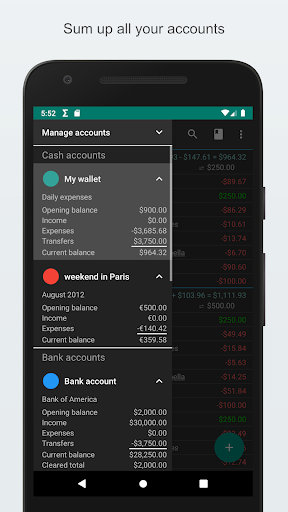
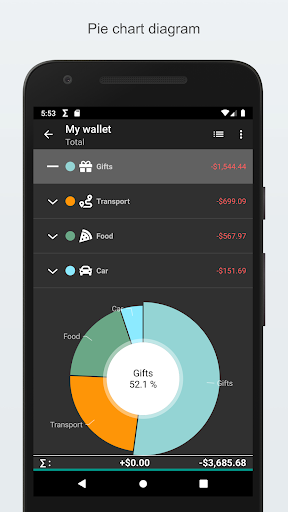
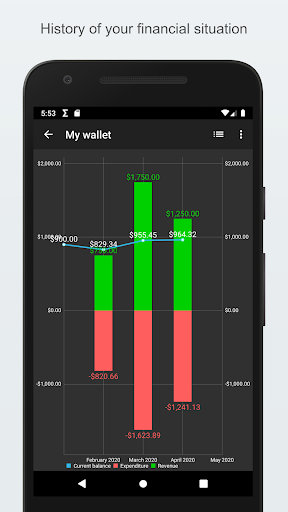
Visually appealing and intuitive, My Expenses boasts a clean layout that enhances user experience. The screenshots reveal a well-organized dashboard where users can view their financial data at a glance. The color palette is soothing, making it easy to navigate the app without feeling overwhelmed by clutter. Key features like expense tracking and income management are prominently displayed, allowing for quick access. The dynamic graphs for data visualization add an extra layer of engagement, helping users understand their spending habits over time. Overall, the graphics are not only functional but also aesthetically pleasing, contributing to a smooth and enjoyable user experience.
Key Features
- Effortless Expense Tracking: Easily monitor your expenses and income with a few taps, ensuring you always know your financial status.
- Flexible Account Management: Manage multiple accounts seamlessly, including handling transfers between different currencies.
- Streamlined Financial Planning: Set up plans for recurring transactions to automate your financial management.
- Seamless Data Management: Import and export your data easily using QIF and CSV formats, which is perfect for users who prefer to analyze their data using different platforms.
- Enhanced Security: Keep your financial data safe with password protection or device lock screen security.
- Customizable Experience: Personalize the app according to your preferences with customizable themes and font sizes, making it truly your own.
- Bank Statement Reconciliation: Compare your transaction statuses with bank statements for accurate tracking.
- Quick Data Entry: Access homescreen widgets and shortcuts for faster data entry, reducing the time spent on manual inputs.
- Powerful Data Analysis: Filter data based on various criteria and visualize historical trends with dynamic graphs for better financial insights.
Mod Features
For those looking to enhance their experience further, here are some plausible mod features that could be included:
- Premium Unlocked: Gain access to all premium features without any additional cost, including unlimited accounts and advanced budgeting tools.
- No Ads: Enjoy an uninterrupted experience without any advertisements, allowing you to focus solely on your finances.
- Unlimited Money: Manage your financial records without restrictions, making it easier to experiment with different budgeting strategies.
- Cloud Backup: Automatically back up your data to the cloud, ensuring that your financial records are safe and easily retrievable.
- Advanced Receipt Scanning: Easily digitize and store your receipts for better expense tracking and management.
How to Install APK on Android
Installing the My Expenses APK on your Android device is a straightforward process. Follow these steps to get started:
- Enable Unknown Sources: Go to your device's settings, navigate to Security, and enable 'Install from Unknown Sources' to allow the installation of apps from sources outside the Google Play Store.
- Download the APK: Click on the download link provided below to start downloading the My Expenses APK file.
- Locate the APK File: Once the download is complete, open your file manager and navigate to the 'Downloads' folder to find the My Expenses APK.
- Install the APK: Tap on the APK file and follow the on-screen instructions to install the app.
- Open the App: After installation, you can find My Expenses in your app drawer. Tap to open and start tracking your finances!
Download My Expenses
If you're ready to take control of your financial management effortlessly, download My Expenses now! Click the link below to get started:
My Expenses is not just an app; it's a comprehensive financial management solution that empowers users to take charge of their finances with ease and efficiency. Whether you're a professional managing multiple accounts or an individual looking to keep your spending in check, My Expenses has the tools you need to succeed.