
Screenshots


Introduction
PrintPro - Receipt & Invoice is a versatile application developed by Vijay Vaidyanathan designed to simplify billing for small businesses, including kirana stores, restaurants, salons, and medical shops. This app enables users to create professional receipts and GST invoices, print them using Bluetooth thermal printers, and send digital copies via WhatsApp—all without the need for an internet connection. In an age where seamless transaction management is vital, PrintPro provides a comprehensive solution that empowers users to manage their billing needs effectively.
Graphics & Gameplay
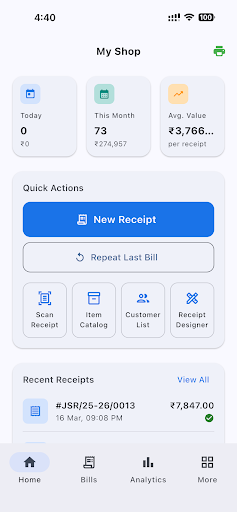
The visuals of PrintPro are clean and intuitive, making navigation easy for users of all tech-savviness levels. The main interface displays options for creating receipts, managing invoices, and accessing business tools in a straightforward layout. Screenshot visuals depict various aspects of the app, such as:
- A user-friendly dashboard showcasing receipt creation tools, ensuring quick access to essential features.
- Templates that allow customization with business logos, UPI QR codes, and various layout options, demonstrating the application's flexibility.
- Reports and analytics screens that visualize sales data, helping users track performance over time.
- A sleek design that accommodates multiple languages, with options clearly laid out for easy navigation.
- Receipt templates that show how invoices can appear in different languages and formats, emphasizing the app's multicultural usability.
Key Features
- Offline Functionality: PrintPro allows users to create and print receipts without an internet connection, making it handy for businesses in areas with poor connectivity.
- GST Compliance: Automatically calculates CGST, SGST, and IGST based on the seller and buyer's locations, ensuring compliance with Indian tax regulations.
- Voice Input: Users can create bills using voice commands, which are processed using on-device speech recognition—eliminating the need for manual typing.
- OCR Scanning: Users can scan and extract information from existing receipts, allowing for easy data entry without typing.
- Multi-Language Support: The app is available in English, Hindi, Tamil, Gujarati, and Marathi, making it accessible to a broader audience.
- Customizable Templates: Users can choose from various receipt templates and customize them to include logos, QR codes, and terms and conditions.
- Business Tools: The app features an item catalog, customer directory, sales analytics, and credit tracking to help manage business operations efficiently.
- Thermal Printer Support: Supports both 58mm and 80mm Bluetooth thermal printers, with features like print preview and multiple copies printing.
- Cloud Backup: Optional Google Sign-In allows for secure cloud backup and restore of data, ensuring business continuity.
Mod Features
- Premium Unlocked: Enjoy unlimited access to all premium features without any restrictions, including unlimited receipts and GST reports.
- No Ads: Experience uninterrupted usage with an ad-free interface, ensuring a seamless billing process.
- Unlimited Money: A fictitious feature that allows users to access premium features freely without any subscription costs.
- Advanced Analytics: Unlock detailed insights into sales trends and customer behavior, helping businesses optimize their strategies.
- Enhanced Customization: Get access to exclusive templates and design options to tailor receipts further to your brand aesthetic.
How to Install APK on Android
Installing PrintPro on your Android device is a straightforward process. Follow these steps:
- Go to your device's Settings and navigate to Security. Enable Unknown Sources to allow installation from sources other than the Play Store.
- Download the PrintPro APK file from a trusted source (like the original URL provided).
- Locate the downloaded APK file in your device's Downloads folder.
- Tap on the APK file to begin the installation process. Follow the on-screen instructions to complete the installation.
- Once installed, open the app and set it up according to your business needs.
Conclusion
PrintPro - Receipt & Invoice is a robust tool for small business owners looking to streamline their billing processes. With its offline capabilities, GST compliance, and user-friendly design, it stands out as a reliable choice for various business types. Whether you run a grocery store, restaurant, or any small enterprise, PrintPro can help you print professional receipts in seconds. Don’t miss out—start simplifying your billing today!
Ready to download PrintPro? Click here to get started and transform your billing process!